Free card price checker for eBay
What it sold for,next to what they want
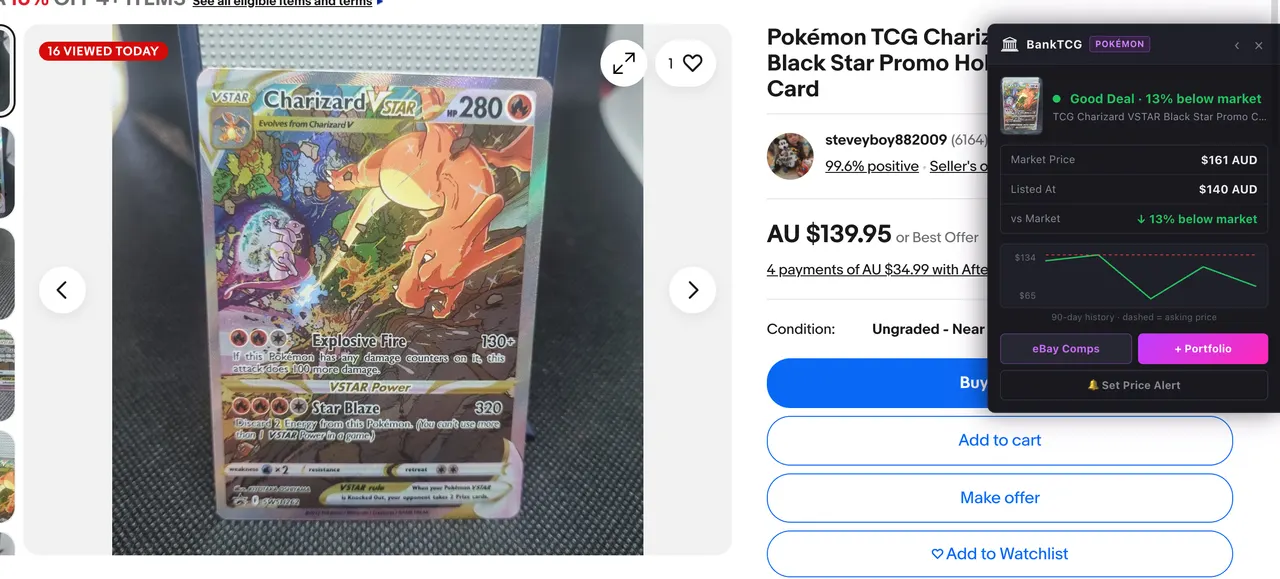
Open any card listing on eBay and BankTCG puts a panel beside the price: the median of recent sold listings for that exact card at that exact grade, and how far the asking price sits from it.
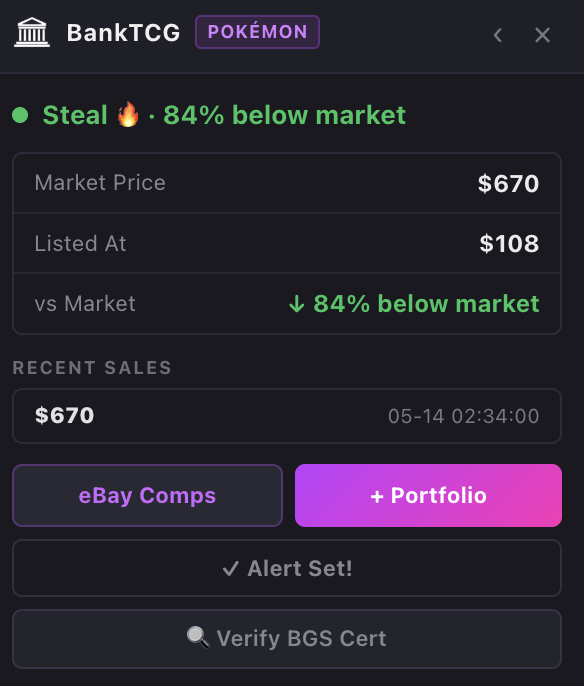
- Sold comps matched on card, number and grade, not asking prices
- Every listing priced free: no cap, no trial
- Listing panel on 14 eBay sites, deal badges on 14
- Pokémon · Yu-Gi-Oh! · Magic · One Piece
- Free BankTCG account. We never see your eBay login
What the panel tells you
Everything below is on the listing you are already looking at.
- Free
Market price
The median of recent eBay sold listings for that card, at that grade. Not an asking price, not an average dragged around by one outlier.
- Free
Deal call
Steal, Great, Good, Fair or Above market, based on how far the asking price sits from that median.
- Legendary
90-day history
A sparkline of the sales behind the number, so you can tell a $600 card that has been climbing from one that spiked once.
- Legendary
Recent sales
The individual sold prices and the dates they sold on. The number is shown with its working out.
- Legendary
Add to portfolio
One click puts the card in your BankTCG portfolio, matched to the right set, number and grade. The panel names the card it matched, so you can check it.
- Legendary
Alt+B to scan
Drag a box around any card image, on any page. BankTCG identifies it and prices it. Useful when a seller’s title tells you nothing.
How the price is worked out
A price you can't check is just a number someone told you.
It is a median, not an average. One mispriced sale can drag an average a long way. The median of the matched sold listings is what the panel shows.
Comps have to match the card. A sold listing naming a different card number is thrown out. A graded comp has to name the same grade: a PSA 10 is not evidence for a PSA 8.
The window stretches for rare cards. The default is the last 90 days. For cards that trade rarely it widens to 180 or 365 days, because three sales in a year still deserve a price.
These are estimates built from public eBay sold listings. They are not appraisals, and nothing here is investment advice.
Free and Legendary
Pricing every listing is free, forever. Legendary adds the evidence behind the number and somewhere to keep the card.
| Feature | Free$0 | LegendaryUS$3.99/mo or US$29.99/yr |
|---|---|---|
| Deal call on every listingSteal through Above market | Included in Free | Included in Legendary |
| Market price from sold compsMedian of matched sales | Included in Free | Included in Legendary |
| Deal badges on search results14 eBay sites | Included in Free | Included in Legendary |
| 90-day price historySparkline of the comps | Not included in Free | Included in Legendary |
| Recent sales listPrices and dates | Not included in Free | Included in Legendary |
| Add to portfolioSyncs to the BankTCG app | Not included in Free | Included in Legendary |
| Alt+B card scannerIdentify any card on screen | Not included in Free | Included in Legendary |
| Price alertsEmailed when one lists under your price | Not included in Free | Included in Legendary |
Price alerts are emailed, not pushed to your browser. Name your price on a listing and we mail the address on your BankTCG account when a matching card lists below it. Ten alerts at a time.
Where it works
Listing panel on 14 sites
ebay.com, ebay.co.uk, ebay.com.au, ebay.de, ebay.fr, ebay.it, ebay.es, ebay.ca, ebay.ie, ebay.at, ebay.be, ebay.nl, ebay.ch, ebay.pl
Search badges on 14 sites
Every site the panel runs on. Deal scores sit on the search results themselves, so you can see which listings are worth opening, in the site's own currency.
Four games

Pokémon

Magic: The Gathering

Yu-Gi-Oh!

One Piece
Getting started
- 1
Add it to Chrome
Install from the Chrome Web Store, then sign in with Google to create a free BankTCG account. That account is what your portfolio syncs against.
- 2
Browse eBay as usual
Open any card listing. The panel appears beside the price on its own. There is nothing to click first.
- 3
Check the comps before you bid
Read the median, the deal call and the sales behind it. Add the card to your portfolio if you buy it.
Your privacy matters
Exactly what it reads, what it sends and what it never touches.
What it reads
The card listing and search pages you open on the eBay sites above: the title, price, condition and any grading details shown. Nothing on any other site.
What it sends
Those listing details, so our servers can return a market price. Cards you add and alerts you set are stored against your BankTCG account.
What it never touches
Your eBay username, password or purchase history. It does not track your browsing outside eBay card listings, and we do not sell data.
The full policy, including where data is stored and how to remove it, is in section 5 of our privacy policy.
Questions
Is the BankTCG extension free?
Yes. The market price, the deal call and the deal badges on search results are free on every listing, with no cap and no trial; you only need a free BankTCG account. BankTCG Legendary (US$3.99 a month or US$29.99 a year) adds 90-day price history, the recent sales list, add to portfolio, the Alt+B card scanner and emailed price alerts.
Where does the market price come from?
It is the median of eBay sold listings that match the card, its number and its grade. Comps naming a different card number are thrown out, and graded comps have to name the same grade. The window is the last 90 days, widening to 180 or 365 days for cards that trade rarely, because three sales in a year still deserve a price. These are estimates built from public sold listings, not appraisals.
Do I need an account?
Yes, a free BankTCG account: sign in with Google and it is made for you. Market prices, deal calls and search badges are free. Legendary features come with the BankTCG iPhone app; use the same Google account there and it is one account. There is no Android app yet: join the waitlist in one click from the extension or at banktcg.com/android, and we will build it once 100 people sign up. We never see an eBay password.
How do price alerts reach me?
By email, to the address on your BankTCG account. A poller checks eBay every 15 minutes and mails you when a matching card lists below the price you named. Alerts are part of BankTCG Legendary.
Which eBay sites does it work on?
The listing panel runs on 14 eBay sites: ebay.com, ebay.co.uk, ebay.com.au, ebay.de, ebay.fr, ebay.it, ebay.es, ebay.ca, ebay.ie, ebay.at, ebay.be, ebay.nl, ebay.ch, ebay.pl. Deal badges on search results run on all 14, and prices are read in each site's own currency.
Does it work on my phone?
No. Chrome extensions only run on desktop Chrome. On a phone, the BankTCG iPhone app scans a card with the camera and shows the same sold-comp price.
Does it show NM/LP/MP prices by condition?
No. eBay sold data does not reliably carry a condition for trading cards, so a grade-by-grade table would be guesswork. Graded cards are priced against comps at the same grade; raw cards are priced against raw comps.
Related guides
- How to sell Pokémon cards on eBay
Pricing from sold listings, fees and shipping.
- Why we built the extension
The overpaying problem it exists to fix.
- How to spot a fake Pokémon card
What to check before you buy from a listing.
- History of the PSA label
Check a graded listing's slab against its era.
- Search 270,000+ card prices
The same prices, without eBay open.
- How to start collecting
Eight steps for new collectors.
The rest of it lives in the app
Cards you add from eBay land in the same portfolio you scan into on your phone. The app adds the camera scanner, AI pre-grading with centering analysis, and eBay listing straight from your vault.